

Please Read Our Price Policy
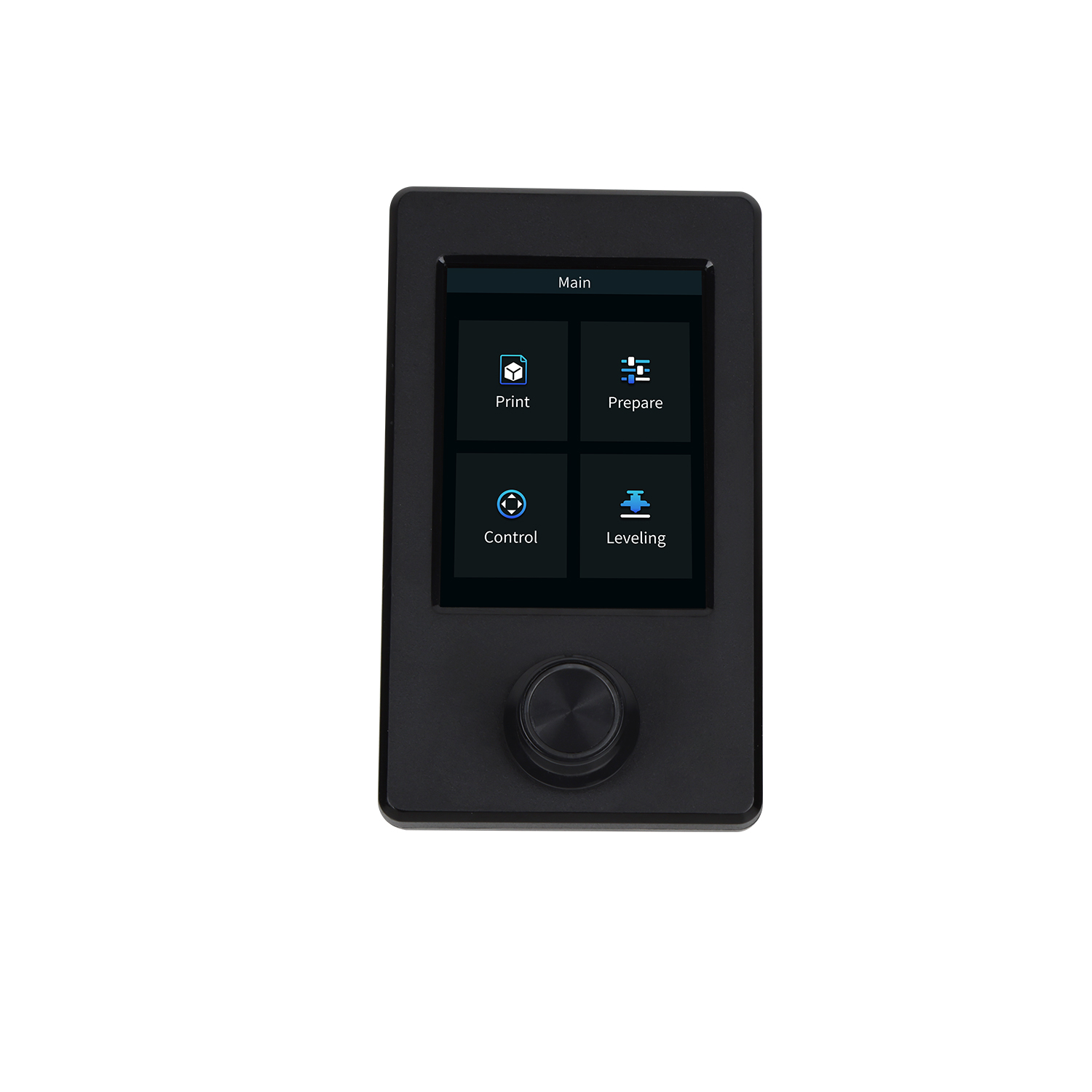
Ender-3 V3 SE Screen Kits
Our Online Price Paying via Bank Transfer R 420.31 incl. VAT
R433.31 incl. VAT
10 Available: Delivery 2-3 Business Days
Upgrade your Ender-3 V3 SE with a clean, responsive screen kit that makes every print easier to control. The kit includes a bright color display, plug‑and‑play cable and mounting hardware for fast installation, plus an intuitive interface for instant access to files, temperatures and print status. Improved visibility and smoother navigation let you preview prints, tweak settings on the fly and monitor progress without fuss. Designed for the Ender‑3 V3 SE—everything you need to modernize your printer in minutes.









Ender-3 V3 SE Screen Kits (SKU: SMD-4001050081)
This screen kit upgrades or replaces the display for Ender-3 V3 SE printers. It improves control, view, and ease of use. Also, it fits the original mounting points for quick setup.
- Compatible with Ender-3 V3 SE printers and related Creality models.
- Plug-and-play design for fast installation and minimal tools.
- Clear color display with responsive touch controls for smooth navigation.
- Intuitive menu layout that reduces setup time and confusion.
- Includes required ribbon cable and standard mounting hardware.
- Supports SD card printing and common file formats for direct prints.
- Adjustable brightness and contrast to suit any workspace lighting.
- Reliable connection to printer mainboard for stable printing sessions.
- Durable construction that withstands daily use in maker spaces.
For benefits, the kit speeds up job setup and tuning. Furthermore, it gives clearer status feedback while printing. Therefore, users gain better control and less downtime.
- Faster access to print controls and presets, saving time.
- Simpler calibration steps, so prints start with fewer errors.
- Improved visual feedback helps catch issues early.
- Affordable upgrade that boosts overall printer value.
What's in the box:
- Screen module built for Ender-3 V3 SE.
- Ribbon cable for mainboard connection.
- Mounting bracket and screws for direct fit.
- Quick start guide with installation steps.
Installation notes: First, power off the printer and unplug it. Next, remove the stock display following safe handling steps. Then, mount the new screen and secure the ribbon cable firmly. Finally, power on and check menu response and settings.
Compatibility note: Confirm your printer model before purchase. Also, some printers may require a firmware update to enable full features. Therefore, check software settings after installation.
Warranty: The product carries a 12-month limited warranty. Terms apply according to seller policies.
Additional information
| Brand |
|---|
Does this product have an incorrect or missing image?
Is this product missing categories?
Please let us know via email
You may also like
-
Corsair Vengeance LPX 16GB (1 x 16GB) DDR4 Desktop
R2,871.09 incl. VAT Add to cart -

Seagate Barracuda 1TB 2.5” Internal
R2,043.85 incl. VAT Add to cart -
Seagate Ironwolf 12TB NAS; 3.5” Internal
R11,168.41 incl. VAT Add to cart -

Seagate Barracuda 5TB 2.5” Internal
R5,504.89 incl. VAT Add to cart

Our Pages
Home
Our Store
Contact Us