

Please Read Our Price Policy
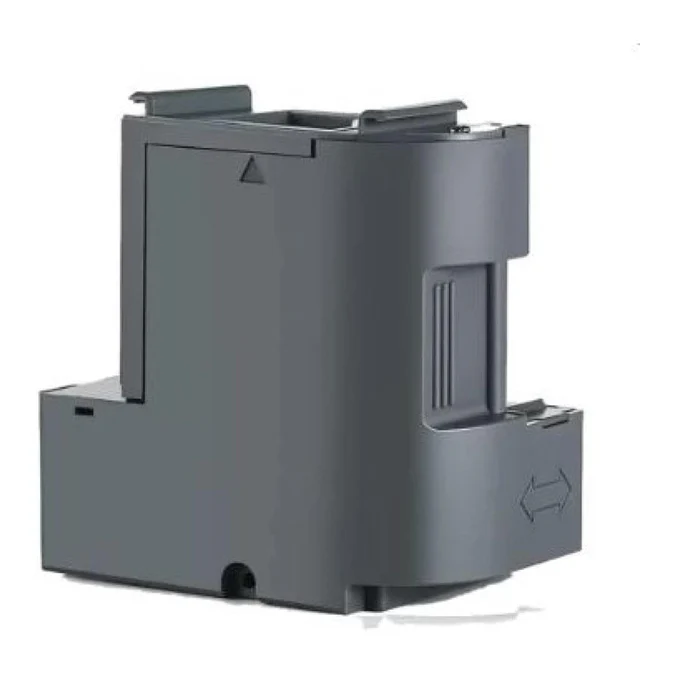
Maintenance Box for Epson SC-F100
Our Online Price Paying via Bank Transfer R 729.54 incl. VAT
R752.10 incl. VAT
3 Available: Delivery 2-3 Business Days
Maintenance Box for Epson SC-F100
Keep your SC-F100 running smoothly with this easy-to-fit maintenance box that captures waste ink from printhead cleanings and priming cycles. Designed for a precise fit, it installs quickly—no tools needed—and prevents overflow that can damage the printer. Replace it when the printer alerts you or during scheduled maintenance to maintain print quality and extend the life of your machine. Genuine and high-quality compatible options are available for reliable performance.









Maintenance Box for Epson SC-F100 — REC-C13S210125 (C13S210125)
Moreover, this Maintenance Box fits the Epson SureColor SC-F100 printers precisely. Additionally, it captures waste ink during routine head cleaning and printing. Furthermore, the unit keeps internal parts dry and reduces service calls. Consequently, it helps maintain print quality and uptime.
Moreover, the item is listed under REC-C13S210125 and C13S210125 for clarity. Additionally, it is an OEM-grade maintenance box made to Epson standards. Furthermore, the package contains one maintenance box ready for direct installation.
- Moreover, compatibility: Epson SureColor SC-F100 models are supported directly.
- Additionally, part number: C13S210125 (also shown as REC-C13S210125) for easy ordering.
- Furthermore, purpose: collects waste ink from cleaning cycles and nozzle checks.
- Additionally, design: high-absorbency pad for reliable ink capture and safe disposal.
- Moreover, installation: tool-free swap for quick maintenance and minimal downtime.
- Additionally, status: printer alerts typically prompt replacement when needed.
- Furthermore, package: includes one ready-to-install maintenance box.
- Additionally, warranty: covered for 12 months from purchase date.
Moreover, replacing the maintenance box is simple and fast. Additionally, follow these steps to change it safely.
- First, power off the printer and open the front access panel.
- Next, remove the old box by releasing its latch and pulling it straight out.
- Then, insert the new maintenance box until it clicks into place.
- Finally, close the access panel and power on the printer to reset the counter.
Moreover, this maintenance box delivers clear value for price-conscious buyers. Additionally, it lowers repair risk and keeps print runs steady. Furthermore, it is an affordable way to preserve your printer investment.
Additionally, for safe disposal follow local waste and recycling rules. Moreover, replacing the maintenance box on schedule preserves print quality and reduces downtime.
Additional information
| Brand |
|---|
Does this product have an incorrect or missing image?
Is this product missing categories?
Please let us know via email
You may also like
-
Corsair Vengeance LPX 16GB (1 x 16GB) DDR4 Desktop
R2,871.09 incl. VAT Add to cart -

Seagate Barracuda 1TB 2.5” Internal
R2,043.85 incl. VAT Add to cart -
Seagate Ironwolf 12TB NAS; 3.5” Internal
R11,168.41 incl. VAT Add to cart -

Seagate Barracuda 5TB 2.5” Internal
R5,504.89 incl. VAT Add to cart

Our Pages
Home
Our Store
Contact Us